Alert() test
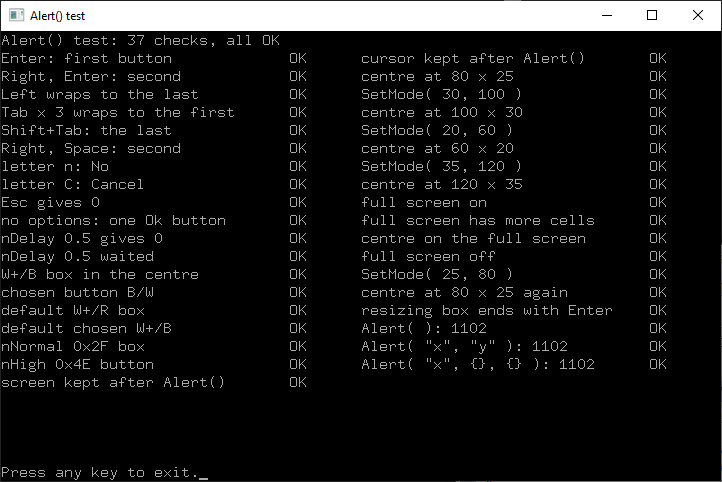
Tests Alert() with keys, colors, nDelay and a window that changes its size while the box is open.
Description
The test needs no key presses until the end. The block of GtInfo( GTI_INKEYREAD ) gives Alert() the keys of a script, one key each time Alert() waits for a key. A step of a script can also be a block: it looks at the screen or changes the size of the window and then returns the key.
GtInfo( GTI_MSGBOX, .F. ) makes Alert() draw its text box with every GT. A GT can show the message box of the system instead; GTGLFW does it by default. The message box is not on the screen of the program, so the test could not see its colors and its place.
The window is empty and "W/N". The box is found by its color with ScreenAttr(): the box is "W+/B", so its cells give its frame. The box is in the centre when its top and left are the same as Alert() computes them for the current screen size.
The last Alert() shows the resizing: SetMode() changes the window to 100 x 30, 60 x 20 and 120 x 35 while the box is open, then the window goes to the full screen for a moment and comes back as 80 x 25. Every size stays for one second, so the box can be seen moving to the centre, and every size is checked. The full screen must have more rows or columns than the window, so the box is in the centre of the monitor, not of a small grid in its corner. The GT changes the size for the full screen when it reads the events of the window, so there Alert() gets the K_RESIZE of the GT. nDelay 30 ends the box if that K_RESIZE never comes. At the end the results are shown in two columns.
Not tested: a mouse click on a button.
Example
AlertImage